Friday, April 17, 2015

Where Are You? - My Scraps & More Sketch #104

Friday is here!  And it's the 3rd Friday in April which means I get to share another layout for the My Scraps & More sketch blog.  Today's reveal is a sketch by the extremely talented Nicole Nowasad!  I love her work, and I really had fun with it.  See my layout below and then go check out all the other layouts from the sketch design team!


Cats are such fun creatures, and my two love to play their version of hide and seek...which means one pretends to hide and the other knows where, but wants to surprise the other one by jumping on them when they emerge from their hiding spot.  Silly kitties!

For my layout, I used Simple Stories Life Documented with a base of kraft cardstock.  I flipped the layout on its side for a bit of fun.  I cut strips of various widths and lengths and inked the edges with dark blue ink.  Instead of laying them all down parallel with each other, I decided to put them at slight angles.  Once I had them where I wanted them, I sewed along each one to create the sense of movement.  For the largest strip, I sewed three shorter lines on each side.  


I matted the photos using the blue polka dot paper, and then placed them over a wood grain strip.  I wanted the photos to have some dimension, so I popped them up with 3D foam tape.

Next I placed a corner embellishment area using the striped paper, one of the Bits & Pieces and an enamel dot.


I created the title with Freckled Fawn Wood Chip Alphas and Simple Stories Sn@p! alphas. I could *NOT* find a question mark that worked, so I created one using the same technique as I used on this fun "Who's Who?" layout! 


I created some journaling spots using more Life Documented Bits & Pieces and enamel dots.


That's it for today!  I hope you use this sketch and play along with My Scraps & More.  If you do, remember to post it for a chance at the April prize, a pack of Pinkfresh Studios Up in the Clouds collection.

Have a scrappy weekend,
Majken

Tuesday, April 14, 2015

Silhouette PixScan Tutorial - Fussycutting Images

Hi everyone!  

Today I wanted to share a tutorial on how to fussycut images using the Silhouette PixScan mat.  It's fairly easy, and if you have a lot to cut, it can be a huge timesaver!

Note:  If you haven't calibrated your PixScan mat for your camera, here's how.

My tutorial will show how I cut the doilies for my Disney World visit with my favorite Hundred Acre Woods friends.  So let's get started!

The first thing you want to do will be to place the paper you want to cut onto the PixScan mat.  This can be a patterned paper or a paper with stamped images you want to cut.  Next, take a photo of it on the mat using the camera you have calibrated.  Make sure the entire mat is in the photo - it's okay if there's other stuff in the frame as well (like my black posterboard I had underneath the mat in the photo below).  Save the photo in a directory on the same computer where you have Silhouette Studio software.


Next, open Silhouette Studio and choose the "Open PixScan Image".


On the right-hand side, the PixScan menu appears.  Choose Import from File, browse to where you saved your PixScan image, and choose it.


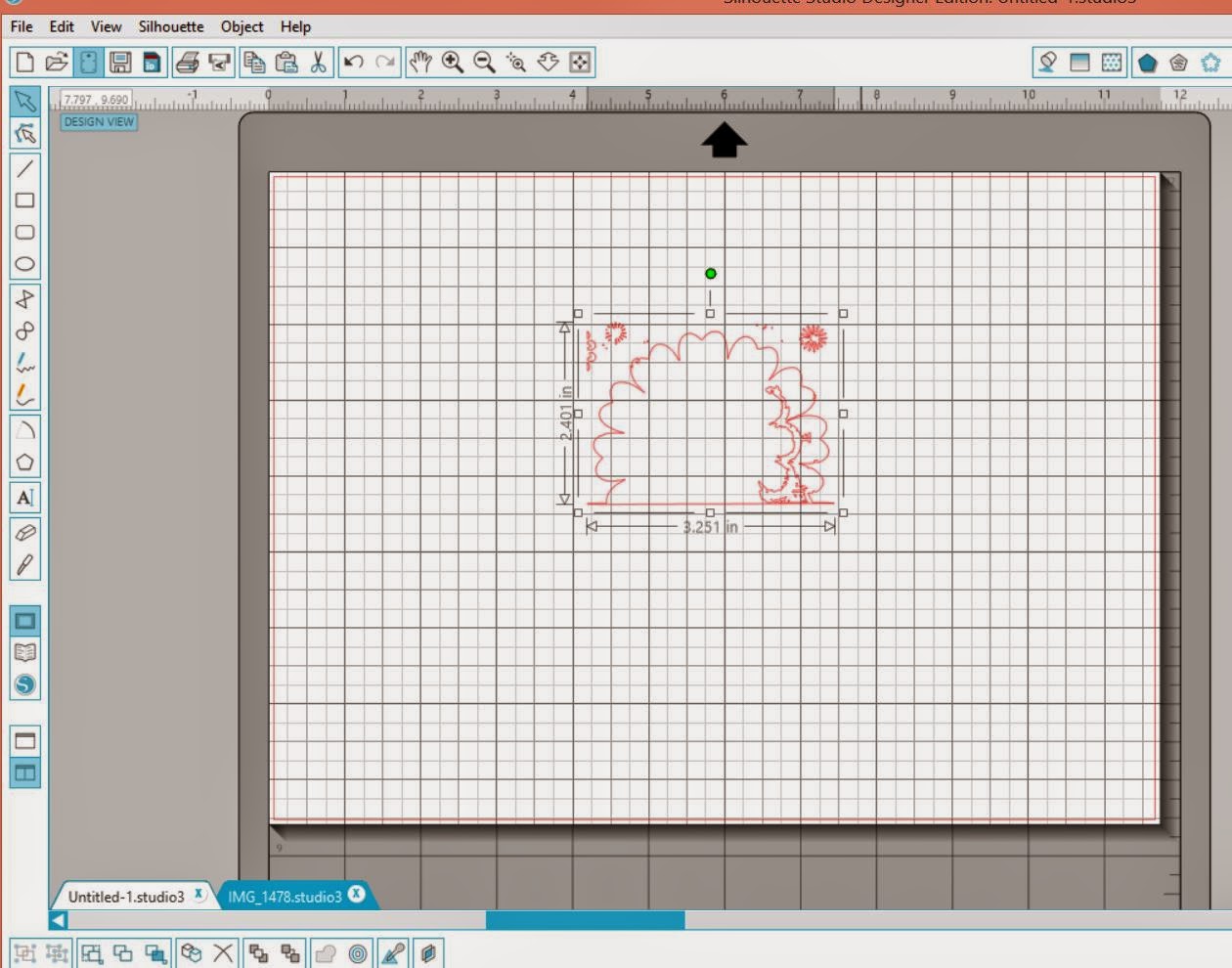
This imports your image and you will see something like this:


Your next step is to open the trace window.  


Then select the image you want to trace for cutting.


Next, select High Pass Filter range and the Threshold range to get as smooth and solid a piece as possible for your cutting edge.  For this doilie, here's the ranges I had.  


Choose "trace outer edge, and then copy the traced area to a new sheet.  It may be imperfect, like mine.  If so, you will want to zoom in, erase what you don't want cut, and edit the points to clean the trace area.

My imperfect trace:


Here I use the erase tool to get rid of the parts I do not want to cut:


The clean trace image now looks like this:


Once that is complete, select all of the cutting image and choose "Make Compound Path".  Copy the full image and go back to the PixScan image screen to paste the cut image back over the part you are going to cut.


Next, if you want a border around your image rather than cutting up against the edge of your image, use the Offset tool.  I created an outside offset of .035".  In this case, I then cut the bottom part off using the knife and deleted it since it's the edge of the paper and doesn't need to be cut.


After you have finished putting the traced image around the image to cut, repeat this for any other images on the same paper that you want to cut at the same time.

Finally, insert the PixScan mat with the paper you took the photo of in step 1 - make sure you don't move this paper after taking the photo!  Choose the "Send to Silhouette" button and adjust your cut settings as needed.  The machine will take in the PixScan mat, look for the registration marks and begin cutting your images.

That's it!

This will save you a lot of time and paper, especially the more you cut at one time.

I hope you enjoyed this tutorial!

Majken

Sunday, April 12, 2015

Smile * Click * Captured - Fancy Pants Sketch This! April

Hi everyone!  I hope you are having a great spring weekend.  It's been rainy here, which is perfect for doing some fun scrapping!  This weekend I completed a layout for the Fancy Pants Sketch This! for April.  This layout highlights our visit to Amarillo for my niece Courtney's wedding.  My daughter, niece Sophie, and mom are seriously be-you-tiful!


I love this polka dot paper from Memories Captured, so I used it as my base.  I stayed pretty true to the sketch, but I added a few extra things.  

For the title area, I used a strip of the Fancy Pants black corrugate cardstock and trimmed the strip from "Strips" with the *click* on it.  I incorporated that into my title.  I used the Black Large Alpha stickers to spell *SMILE*, and then a sticker with "captured" on it from the collection.  I created a corner embellishment area with some stitching, and I cut one of the circles and popped it up with 3D foam.


The photo area is matted with the Shining Stars and Memories papers (I stitched along the stars paper after distressing it), and includes a tag, some stickers, and a burlap bow from the Burlap & Bouquets collection.  I heart this bow! I die cut an arrow from the burlap paper to balance out the burlap from the bow and popped it up with 3D foam. 


That's it for me for today.  Stay tuned this week for another sketch reveal for My Scraps & More on Friday.  Until then, I hope you get a few final bits of Easter candy to enjoy!

Majken

Friday, April 3, 2015

Lucky 13 - My Scraps & More Sketch #103 Reveal

Hi sketchy, scrappy folks out there in papercrafting land!  Happy Friday!

I'm having a blast participating with the My Scraps & More sketch team, and today's reveal has a great sketch created by Audrey Yeager.  See my layout below, and then head over to the MSAM sketch blog to see how everyone else interpreted the sketch.  I used Pinkfresh Studio's Up In The Clouds collection.  

My daughter recently turned thirteen (eek!), and we celebrated with a dinner out at the restaurant of her choice.  


My layout base was a Bazzill textured cardstock I had in my stash and matched the Pinkfresh very nicely.  And I wanted the photo to rest on the neutral paper with the doodled hearts and stars, so I actually worked with that next.

After I had that part together, I inked the paper edges with a blue-green ink and layered the pink "Love" paper and the blue stitched papers behind it angled similarly to the sketch.  Once I had the layers the way I wanted them, I cut the title numbers from the center of the blue stitched paper since I knew that would be hidden by the layers on top.  This is a great way to save paper!


I finished the title with ink and stitching and then used Heidi Swapp alphas to spell "Lucky" over it.

For the top strip, I angled the doodle paper, inked the edge and stitched across it.  Then I included some of the Pinkfresh hearts, some gems, and a wooden star.  You can also see I outlined and filled in several of the hearts with a Gelly Roll glitter pen.  I stitched around several parts of my layered papers.


Next, I created an embellishment cluster using a Heidi Swapp "shine", another Pinkfresh heart, and a wooden arrow.


I completed the layout with journaling.  You can see more hearts and stars filled in with a Gelly Roll glitter pen.


I hope you join us with this sketch!  Post your interpretation of the sketch during April for a chance at a great prize from My Scraps & More.

Have a fabulous weekend!

Majken

Thursday, April 2, 2015

Scrapping Our Stash Giveaway Winner!

Well, I'm sorry to have failed to post the winner of the blog hop giveaway, but better late than never?

Thank you all for being such great followers -- I am so glad to read everyone's comments.

The winner of this month's hop giveaway is #3:


Scrolling down in the comments section, #3 is Janet!  Congrats Janet!


Janet, please email me at majkenmarie at yahoo dot com before end of day Tuesday, 4/7, and I'll get your $15 e-gift card to you via email.

If you didn't get a chance to view the blog hop, there's one on the last Friday/weekend of every month.  See you on April 24th!

Enjoy your Easter (with some chocolate!),
Majken

Thursday, March 26, 2015

Milestone: Kindergarten - Scrapping Our Stash Blog Hop - Giveaway Included

Happy Friday everyone, and thanks for joining us for another "Scrapping Our Stash" blog hop! You should've arrived from Sandy's blog - love that layout of her sweet grandbaby! If you've lost your way, the full list is at the bottom of this post, just after the GIVEAWAY information.  :)  Take a look at today's layout and then follow the directions for a chance to win!

Today I'm sharing a two-page layout, which I haven't done in awhile.  It was fun to do because I had several photos I wanted to include for Paxton's first day of Kindergarten. I dug into my stash and came up with Bella Blvd's Max collection.  It's so fun, and I also have used it for another layout with him.  For today's project, I used a PageMaps sketch from Scrapbooks & Cards Today Spring 2015 issue.


I blurred his teacher's face and name to protect her privacy.

Here is the sketch - I broke the 5x7 photo on the left into two photos, and the flowers became stars!


 I liked the colorful variety of the Text Me paper, so I used that across the bottom of two pieces of textured white cardstock.  I included a border that uses the striped paper as well as a strip of blue "All Boy", and then I sewed along underneath that border strip.


For my title, I used the orange stickers from the collection for "Milestone:" and cut "kindergarten" out using my Cameo.  I trimmed 3D foam tape to pop up "kindergarten".

For the photos, I inked the edges using black Stazon ink to help frame them.  Next I matted them using the grey camoflage paper and the blue robot paper, and then I sewed a border just inside the grey camoflage paper.  I matted my favorite photo of him using white cardstock to help it stand out.  And I used various stickers from the collection around the layout.


The top left corner includes striped paper, green scalloped border sticker, blue corner sticker, sewing, and stars trimmed using my Cameo.


The top right area includes blue scalloped border sticker, trimmed green border sticker, sewing, and more stars.


I hope you enjoyed my version of this sketch!  

Ready for my giveaway??  Yes??

I'm giving away one $15 e-gift certificate to My Scraps & More.  All you have to do is:
  • Be or become a member of my blog with Google+, Friend Connect, or Bloglovin AND
  • Leave a comment on this blog post
Refer a friend who joins my blog for an extra chance at the prize (please note that you have done this in a 2nd comment and have the referral tell who referred them in a comment on this post).

Simple!  You have until Monday, March 30th at noon Central time to enter for your chance to win.  International entries are fine, and I use random.com to choose the winner.  I'll announce the winner here on my blog on Tuesday, March 31st.  Good luck!  

Now it's time to hop to Juliana's blog to check out her adorable puppy layout!

Have a scrappy weekend!  Make it one with a bit of chocolate.  ;)
Majken

The full blog hop list if you wish to start at the beginning:


Friday, March 20, 2015

XOXO - My Scraps & More Sketch Reveal #102

I hope everyone is enjoying their Friday...it is International Day of Happiness, after all!  Welcome to another sketch reveal from the My Scraps & More sketch blog.  See my creation below, but please go check out all the other great designs from the team.  I created this layout using Crate Paper's Kiss Kiss - it's so fresh and pretty!  I felt it matches these cousins' rosy cheeks as I caught a photo of them hugging.  So cute!!


 I used the Kiss Kiss paper with the rosy heart on it for my base.  I cut various hearts out using my Cameo, then I distressed the edges of each of them.  In lieu of the cross-hairs in the sketch, I sewed Xs through the hearts to represent kisses.


I decided the title of XOXO would be perfect, so I found a font I liked and cut that out - I purposely left the title plain and sewed over it.  I wanted it to be soft and subtle.  I stretched the title a bit to the left from what the sketch has.


Next I created an embellishment area in the top left using a "love" wooden embellishment, and I sprinkled a few tiny wooden hearts around the layout.


I matted the photo with pink and layered it again on the words paper.  I stuck a tab of organdy ribbon and a heart pin, and popped up the photo with 3D tape for dimension.


And here is Ashley Horton's sketch:


That's all for me - thanks so much for stopping by my little piece of the blog world today! May your weekend be as sweet as chocolate.  <3

Majken